Built for everything your payslip doesn't explain.
Three problems we hear from Jamaican earners over and over. We built one tool to solve all of them.
Confusing payslips
NIS, NHT, education tax, PAYE — most payslips list deductions without showing how they're computed. See every line, transparently.
Manual tax math
Skip the spreadsheets and outdated calculators. Current thresholds, rates and caps for the Jamaican tax year are handled automatically.
Planning ahead
Model a raise, a pension change, or an extra income line before you commit. Know exactly what hits your pocket.
Everything you need in one calculator.
Six features that cover the full picture of a Jamaican payslip. No upsells, no premium tier.
PAYE income tax
Lower and upper rate thresholds applied automatically based on the selected tax year.
NIS, NHT & education tax
All statutory deductions calculated with current employee rates and monthly caps.
Pension contributions
Set compulsory and voluntary percentages, applied only to pension-eligible earnings.
Multiple earnings lines
Add salary, allowances, bonuses, and overtime — tag each as pensionable or not.
Post-tax deductions
Staff loans, insurance premiums, union dues — add as many lines as you need.
Printable payslip
Monthly and annual breakdowns, ready to export or print as a clean sample payslip.
From gross to net in three steps.
No tutorial needed. Most people get their full breakdown in under a minute.
Enter earnings
Add salary, allowances, bonuses — mark which lines are pensionable.
Set deductions
Pension rates, NIS status, and any post-tax items like loans or insurance.
See your net pay
Full breakdown, monthly and annual, ready to print or export.
Anyone earning, hiring, or planning in JMD.
If your pay involves Jamaican statutory deductions, this calculator was built with you in mind.
Employees
Verify the numbers on your payslip.
Job seekers
Compare offers by real take-home.
HR & payroll
Quick estimates without spreadsheets.
Freelancers
Plan and budget your income.
See exactly what you'll get before you click.
No surprises. The calculator produces a clean, printable breakdown showing every line item — gross, statutory deductions, pension, and your final net pay.
Try it with your numbers →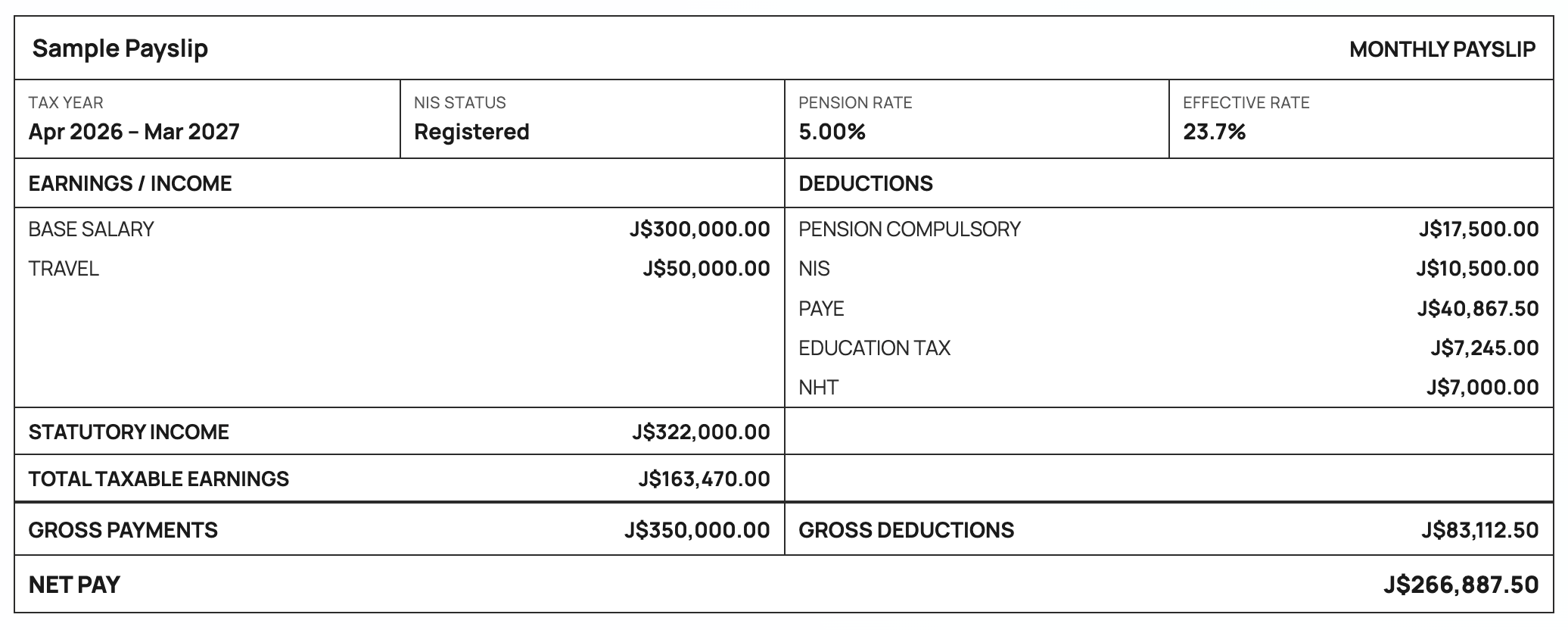
Things people usually ask.
If your question isn't here, get in touch — we update this list often.
How accurate is the calculator?
The calculator uses the current PAYE thresholds, NIS, NHT, and education tax rates published for the selected tax year. Results are reliable estimates, but your actual payslip may vary slightly depending on employer-specific arrangements. All tax parameters are also editable if you need to override them.
Is my data stored anywhere?
No. The calculator runs entirely in your browser. We don't store, log, or transmit any of the salary information you enter.
Which tax years does it cover?
The calculator currently supports April 2025 – March 2026, April 2026 – March 2027, and April 2027 – March 2028, with thresholds and rates pre-loaded for each.
Can I adjust the tax parameters?
Yes. Open the "Show tax parameters" panel to edit thresholds, rates, and the NIS cap. This is useful for modelling proposed changes or for years not yet pre-loaded.
Does it handle non-pensionable earnings?
Yes. Each earnings line can be tagged as pensionable or not. Pension contributions are then calculated only on the eligible portion of your gross pay.
Can I use this for official tax filing?
No. The calculator is a planning and verification tool. It provides estimates and is not a substitute for professional tax advice or official tax returns. Always consult a tax professional or TAJ for official matters.